 RoomDisk
An AirDrop alternative that works across every device
AirDrop is quick for a few photos between Apple devices. It doesn’t work with Windows or Android. RoomDisk works between any two devices with a browser (iPhone to Windows, Android to Mac, phone to phone), checks every file and resumes big transfers.
How to do it
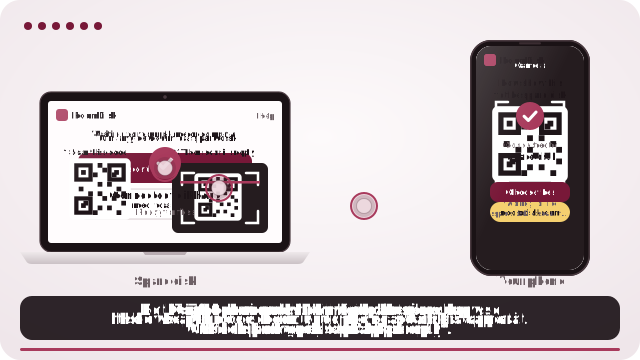
- Open roomdisk.com/app on the device that will keep the files and choose Use this device as the spare disk. It shows a QR code.
- On the phone or computer with the files, scan that code. A phone’s Camera app works: tap the roomdisk.com link that pops up. RoomDisk opens and shows its own code.
- On the spare disk, tap Scan reply and hold the phone’s screen up to its camera. (No camera there? Tap Share reply on the phone and open it on the disk device.)
- Both screens say Connected. Choose files and send. Each file is checked when it lands.
RoomDisk vs AirDrop
| RoomDisk | AirDrop | |
|---|---|---|
| Devices | Any with a browser | Apple only |
| Pairing | Two QR scans | Automatic nearby |
| Checks each copy | Yes, SHA-256 with receipts | No receipt |
| Resume after a cut-off | Yes | Starts again |
| A disk you can browse later | Yes | No |
Use AirDrop for a single photo to a friend’s iPhone. Use RoomDisk to clear a camera roll onto a spare device, or to move files between Apple and non-Apple devices.
AirDrop is a trademark of its owner. RoomDisk isn’t affiliated with it.
Questions
Does RoomDisk work between iPhone and Android?
Yes, in both directions, in the browser on each.
Is it as fast as AirDrop?
Both go directly between the devices; speed depends on the Wi-Fi. RoomDisk adds a check of every file and resumes if cut off.
Try it with the two devices you have
Free to start. Nothing to install, no account.